
Any good advice is appreciated. I'm looking to upgrade our home computer. We don't Game but we do mess around with pictures and videos. We use PowerPoint, Excel, and Word in the latest version MS Office. We have an external hard-drive and a good enough flat panel monitor. We also use wireless connections between the internet, printer, keyboard, mouse, and laptop. I would like to have a computer setup to play music well.
Our current desktop is old and slow. It also sounds like the hard-drive is constantly cycling. Let me know if your ideas. I would like to keep the price below $700.
TIA...Steve
Help with selecting a new desktop computer
Moderator: TJDave
Help with selecting a new desktop computer
I don't Text (at least not very well), I eat Blackberrys, and I only Twitter after sex...
-
commando14

- Peak Putters Member

- Posts: 1224
- Joined: Sun Mar 11, 2007 3:37 pm
- Location: Kennewick, WA
The make is "Systemax". The model is "Venture"
Here are some of the computer's specs.
Inter (R)
Pentuim(R) 4 CPU 3.00GHz
3.01GHz 1.00 GB Ram
DVD/CD-Rom Drives: Memorey DVD+- RAM 550L v1 and SOny CD-RW CRX32EE
I can't find the information regarding the size of the harddrive.
Here are some of the computer's specs.
Inter (R)
Pentuim(R) 4 CPU 3.00GHz
3.01GHz 1.00 GB Ram
DVD/CD-Rom Drives: Memorey DVD+- RAM 550L v1 and SOny CD-RW CRX32EE
I can't find the information regarding the size of the harddrive.
I don't Text (at least not very well), I eat Blackberrys, and I only Twitter after sex...
SPR wrote:The make is "Systemax". The model is "Venture"
Here are some of the computer's specs.
Inter (R)
Pentuim(R) 4 CPU 3.00GHz
3.01GHz 1.00 GB Ram
DVD/CD-Rom Drives: Memorey DVD+- RAM 550L v1 and SOny CD-RW CRX32EE
I can't find the information regarding the size of the harddrive.
Wow, that makes my home computer look real bad:
Generic build AMD Athlon XP2500 2.1g
512k ram, 3.5" floppy drive, and an old CDRW drive that doesnt work.
I have reformatted it twice, and it is still working great with Windows XP.
I am looking to upgrade also. I am really leaning towards an Apple product.
Paul
'84 XJ, '19JL
'84 XJ, '19JL


-
mattawajeep

- Posts: 1221
- Joined: Wed May 19, 2010 6:18 pm
- Location: Mattawa, WA
-
mattawajeep
- Posts: 1221
- Joined: Wed May 19, 2010 6:18 pm
- Location: Mattawa, WA
Sent you an email with a parts list.
Should come out to 700 with shipping. Of course, you wouldn't have to buy the parts I listed all from one place. Shopping around could save you some more cash.
Windows 7 (In case you only have a copy of XP or something)
Intel I5 3.1ghz Quad Core (About 10 times faster than your current pc)
4 GB DDR3 1600 (Very fast and reliable stuff - use this in my PC)
Fanless video card (No games, but quiet and great for your purposes)
128 GB SSD (Small by modern standards but bigger than what you already have I would imagine - and since you have an external drive, that doesn't matter. This thing is fast, program opening and boot time should be extremely quick)
Should come out to 700 with shipping. Of course, you wouldn't have to buy the parts I listed all from one place. Shopping around could save you some more cash.
Windows 7 (In case you only have a copy of XP or something)
Intel I5 3.1ghz Quad Core (About 10 times faster than your current pc)
4 GB DDR3 1600 (Very fast and reliable stuff - use this in my PC)
Fanless video card (No games, but quiet and great for your purposes)
128 GB SSD (Small by modern standards but bigger than what you already have I would imagine - and since you have an external drive, that doesn't matter. This thing is fast, program opening and boot time should be extremely quick)
Dale,
When building one, would I use the same desktop case? How do you easily transfer files and programs from one desktop to the other?
Below are the specs for a Dell at $700. Do you see anything that you would change. I did not see an option for a SSD only a HHD. Is there anyway to make this thing play music from the internet well?
Software & Services
Windows 8, 64-bit, English
3rd Generation Intel® Core™ i5-3350P processor (6M Cache, up to 3.10 GHz)
Microsoft® Office trial
8GB Dual Channel DDR3 1600MHz - 2 DIMMs
16X CD/DVD burner (DVD+/-RW), write to CD/DVD
1TB 7200 RPM SATA Hard Drive 6.0 Gb/s
NVIDIA GeForce GT 620 1GB DDR3 for Win 8
1 Year Enhanced Support - America's Best Standard Support
My Accessories also Includes
XPS 8500
XPS8500,BlackChassisw/19:1mediacardreader
No Anti-Virus Software Selected
No speakers (Speakers are required to hear audio from your system)
Dell Wireless 1703 802.11b/g/n, Bluetooth v4.0+LE
Integrated 7.1 with WAVE MAXXAudio 4
Integrated 10/100/1000 Ethernet
No Monitor
No Adobe Reader Selected
Dell SRV Software 1703
English Documentation DAO
Additional Software
Cyberlink Media Suite Essentials DVD
US Power Cord
Dell KB213 Wired Multimedia Keyboard, US-English
Dell Laser Mouse
Adobe Photoshop Elements and Premiere Elements- Additional software purchase required
When building one, would I use the same desktop case? How do you easily transfer files and programs from one desktop to the other?
Below are the specs for a Dell at $700. Do you see anything that you would change. I did not see an option for a SSD only a HHD. Is there anyway to make this thing play music from the internet well?
Software & Services
Windows 8, 64-bit, English
3rd Generation Intel® Core™ i5-3350P processor (6M Cache, up to 3.10 GHz)
Microsoft® Office trial
8GB Dual Channel DDR3 1600MHz - 2 DIMMs
16X CD/DVD burner (DVD+/-RW), write to CD/DVD
1TB 7200 RPM SATA Hard Drive 6.0 Gb/s
NVIDIA GeForce GT 620 1GB DDR3 for Win 8
1 Year Enhanced Support - America's Best Standard Support
My Accessories also Includes
XPS 8500
XPS8500,BlackChassisw/19:1mediacardreader
No Anti-Virus Software Selected
No speakers (Speakers are required to hear audio from your system)
Dell Wireless 1703 802.11b/g/n, Bluetooth v4.0+LE
Integrated 7.1 with WAVE MAXXAudio 4
Integrated 10/100/1000 Ethernet
No Monitor
No Adobe Reader Selected
Dell SRV Software 1703
English Documentation DAO
Additional Software
Cyberlink Media Suite Essentials DVD
US Power Cord
Dell KB213 Wired Multimedia Keyboard, US-English
Dell Laser Mouse
Adobe Photoshop Elements and Premiere Elements- Additional software purchase required
I don't Text (at least not very well), I eat Blackberrys, and I only Twitter after sex...
-
mattawajeep
- Posts: 1221
- Joined: Wed May 19, 2010 6:18 pm
- Location: Mattawa, WA
I'm in Spokane on my phone, but most of that looks good though I'd be leary of windows 8 so soon after release. A SSD would be a lot faster - might be a hard option to get on reasonable desktop from Dell.
As far as a case goes - that e-mail I sent with the parts included a new case - though your old case might be usable. Along with the cdrw drives ect...
Programs can be very difficult to transfer if you don't have the original install disks. But files would be easy, just put all your stuff on the external drive.
What operating system does your old PC have?
As far as a case goes - that e-mail I sent with the parts included a new case - though your old case might be usable. Along with the cdrw drives ect...
Programs can be very difficult to transfer if you don't have the original install disks. But files would be easy, just put all your stuff on the external drive.
What operating system does your old PC have?
-
mattawajeep
- Posts: 1221
- Joined: Wed May 19, 2010 6:18 pm
- Location: Mattawa, WA
-
mattawajeep
- Posts: 1221
- Joined: Wed May 19, 2010 6:18 pm
- Location: Mattawa, WA
Hmm, that's the address I used - oh well, finally got the public wishlist thing working - which is easier than the e-mail one.
Here's the build list:
http://secure.newegg.com/WishList/Publi ... r=20616145
Now that I'm on a real computer I took a closer look at the Dell, and it's a good system essentially the same as what I've outlined minus a SSD, custom picked RAM, and windows 7.
Prices between system builders like Dell, and building your own have been getting closer, and they're surprisingly close on this build. I think that partly has to do with changes in their basic support plan (used to be 2 years) and parts suppliers getting smarter. Probably also has something to do with how easy assembly is now - chances of frying your computer are extremely low unlike the old days.
I'll bet if you called Dell you could probably get a SSD added, and have them get you Windows 7 instead of Windows 8.
Oh, and nothing special needs to be done to either of these systems to play music from the internet. Should work great from either one.
Here's the build list:
http://secure.newegg.com/WishList/Publi ... r=20616145
Now that I'm on a real computer I took a closer look at the Dell, and it's a good system essentially the same as what I've outlined minus a SSD, custom picked RAM, and windows 7.
Prices between system builders like Dell, and building your own have been getting closer, and they're surprisingly close on this build. I think that partly has to do with changes in their basic support plan (used to be 2 years) and parts suppliers getting smarter. Probably also has something to do with how easy assembly is now - chances of frying your computer are extremely low unlike the old days.
I'll bet if you called Dell you could probably get a SSD added, and have them get you Windows 7 instead of Windows 8.
Oh, and nothing special needs to be done to either of these systems to play music from the internet. Should work great from either one.
-
commando14
- Peak Putters Member
- Posts: 1224
- Joined: Sun Mar 11, 2007 3:37 pm
- Location: Kennewick, WA
I'm a big fan of Dell... mainly because of my experience with them at work. Back in the day when i was the OS image guy it was so much easier building images on the Dell's as compared to some other brands like HP.
I like the Optiplex's which is Dell's business line of desktops... slightly better internal parts built to last a bit longer than the home line models or the cheaper models you'll find at the retail stores like Best Buy... though those models are decent too now days. You can get Optiplex's around the $500 range I believe.. and I agree with Dale that an SSD drive can make all the difference in the world.. and price is coming down on SSD's. But usually best to buy the SSD separate from a vendor like Kingston or Intel and put it in the desktop.. typically the SSD's that they bundle with desktops are way over priced. I can check some prices/configs later tonight.
I like the Optiplex's which is Dell's business line of desktops... slightly better internal parts built to last a bit longer than the home line models or the cheaper models you'll find at the retail stores like Best Buy... though those models are decent too now days. You can get Optiplex's around the $500 range I believe.. and I agree with Dale that an SSD drive can make all the difference in the world.. and price is coming down on SSD's. But usually best to buy the SSD separate from a vendor like Kingston or Intel and put it in the desktop.. typically the SSD's that they bundle with desktops are way over priced. I can check some prices/configs later tonight.
-
Grumpy

- Peak Putters' Land-Use Coordinator
- Posts: 6049
- Joined: Wed Mar 14, 2007 8:38 am
- Location: Kennewick, WA
David had some involvement with our computers at the Arc. That system works, and both our desk tops at home are Dell. No complaints...
Dave
Have Scout, will wheel...Someday...Maybe
Quote:
Originally Posted by Oregon80
-By driving a Scout, you my friend have recycled, which is more than those pansy Prius owners can say.
-I love driving a piece of history that was nearly lost.
Have Scout, will wheel...Someday...Maybe
Quote:
Originally Posted by Oregon80
-By driving a Scout, you my friend have recycled, which is more than those pansy Prius owners can say.
-I love driving a piece of history that was nearly lost.



Thanks guys for your comments and recommedations.
I will take a stab using the detials that Dale gave me to see if I can find a Dell unit that is similar in specs and price. Thanks Dale for some for putting that together -- it put me on the right path for selecting options.
I spec/priced out a Dell Optiplex and it ran around $1200. I think that is what I have been using at work for the last few years. Its been a very good machine. I don't know much about computers but it seems that tech. is changing so fast and I don't want to drop too much on a new computer.
I will take a stab using the detials that Dale gave me to see if I can find a Dell unit that is similar in specs and price. Thanks Dale for some for putting that together -- it put me on the right path for selecting options.
I spec/priced out a Dell Optiplex and it ran around $1200. I think that is what I have been using at work for the last few years. Its been a very good machine. I don't know much about computers but it seems that tech. is changing so fast and I don't want to drop too much on a new computer.
I don't Text (at least not very well), I eat Blackberrys, and I only Twitter after sex...
-
commando14
- Peak Putters Member
- Posts: 1224
- Joined: Sun Mar 11, 2007 3:37 pm
- Location: Kennewick, WA
Steve, the XPS 8500 specs look good.. hard to beat the price for all the features you get with it.
I currently have a few older Optiplex desktops I use at home but if I was to get a new one this is probably what I would get.. an Optiplex 7010.. configured with only 2GB of RAM because the upgrade to 8GB costs $130 from Dell, but you can go to Crucial.com and get 8GB for the 7010 for $40. That puts it around $630. That's with the onboard video adapter which would probably be fine, but video cards are around the $40 range on newegg etc. and easy to install.
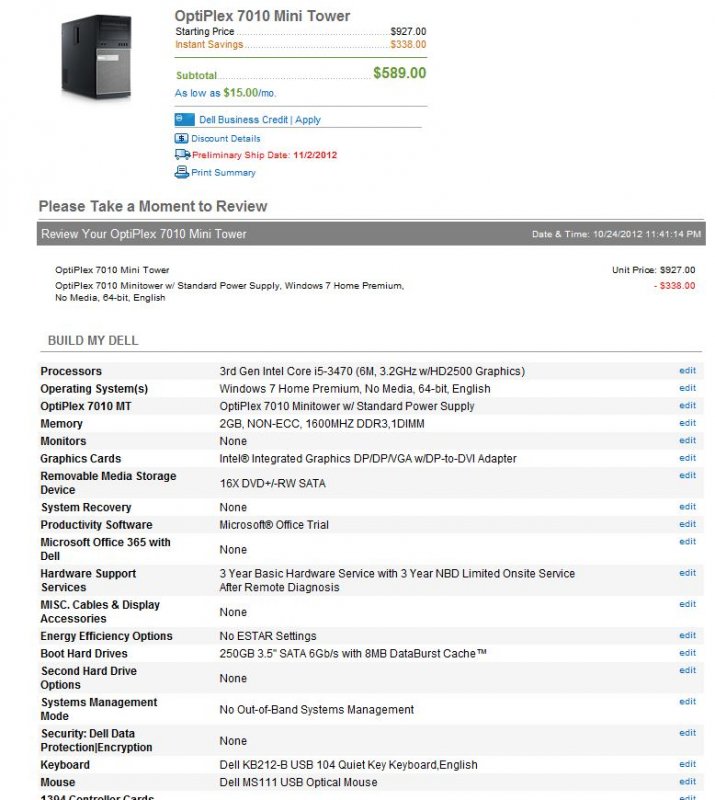
I currently have a few older Optiplex desktops I use at home but if I was to get a new one this is probably what I would get.. an Optiplex 7010.. configured with only 2GB of RAM because the upgrade to 8GB costs $130 from Dell, but you can go to Crucial.com and get 8GB for the 7010 for $40. That puts it around $630. That's with the onboard video adapter which would probably be fine, but video cards are around the $40 range on newegg etc. and easy to install.
-
mattawajeep
- Posts: 1221
- Joined: Wed May 19, 2010 6:18 pm
- Location: Mattawa, WA
That looks like a good deal to me - and onboard video shouldn't be an issue for your uses - especially if you have over 4GB of RAM. Dell business models last forever, I have a few workstations over 10 years old that I use as backup servers. You won't have issues with the minor parts like fans and power supplies going out. Didn't even think of going that route.
You can, as David suggested buy a SSD separately and drop it in. The Samsung 830 in my build is highly recomended and I believe it comes with software you can use to migrate the operating system over to the new drive. That, or pay Dell whatever their extra fee is for their windows install disk and start out clean.
The only thing I don't see is any mention of wireless capeabilities - but that could be because the screenshot is cut off. Either way, it's also something easy to add on. Of course, if it was me, I would just run a cable to the computer - especially if there's only one desktop in the house.
You can, as David suggested buy a SSD separately and drop it in. The Samsung 830 in my build is highly recomended and I believe it comes with software you can use to migrate the operating system over to the new drive. That, or pay Dell whatever their extra fee is for their windows install disk and start out clean.
The only thing I don't see is any mention of wireless capeabilities - but that could be because the screenshot is cut off. Either way, it's also something easy to add on. Of course, if it was me, I would just run a cable to the computer - especially if there's only one desktop in the house.
David and Dale,
Thanks again for the comments. I suspect that there are a few folks lurking and learning from this post.
I've spent a ton of time this morning on the Dell Business site and came up with something very similar to what David posted. Only different is the 7010 that I configured had 4GB RAM instead of 2GB RAM and the price was $669. David's option for a RAM upgrades sounds like a better deal. Is it tricky to swap out the RAM on these things?
Also, I could not find any wireless/bluetooth options for the OptiPlex. We currently us a couple of USB wireless gadgets on our computer for the internet and keyboard. It would be nice to get rid of these external gadgets.
I cannot tell is the Optiplex has the device for reading various size memory cards. Our current computer has this device as well as a DVD burner that prints designs/labels on the face of the DVD. If needed, I would like to swap these into the new computer. Therefore, I will likely need a big tower for all the extra stuff.
You two have done me well, any additional advice is appreciated.
Thanks again for the comments. I suspect that there are a few folks lurking and learning from this post.
I've spent a ton of time this morning on the Dell Business site and came up with something very similar to what David posted. Only different is the 7010 that I configured had 4GB RAM instead of 2GB RAM and the price was $669. David's option for a RAM upgrades sounds like a better deal. Is it tricky to swap out the RAM on these things?
Also, I could not find any wireless/bluetooth options for the OptiPlex. We currently us a couple of USB wireless gadgets on our computer for the internet and keyboard. It would be nice to get rid of these external gadgets.
I cannot tell is the Optiplex has the device for reading various size memory cards. Our current computer has this device as well as a DVD burner that prints designs/labels on the face of the DVD. If needed, I would like to swap these into the new computer. Therefore, I will likely need a big tower for all the extra stuff.
You two have done me well, any additional advice is appreciated.
I don't Text (at least not very well), I eat Blackberrys, and I only Twitter after sex...
-
mattawajeep
- Posts: 1221
- Joined: Wed May 19, 2010 6:18 pm
- Location: Mattawa, WA
SPR wrote:I've spent a ton of time this morning on the Dell Business site and came up with something very similar to what David posted. Only different is the 7010 that I configured had 4GB RAM instead of 2GB RAM and the price was $669. David's option for a RAM upgrades sounds like a better deal. Is it tricky to swap out the RAM on these things?
Ram is easy to swap out - or to add more so long as you have the right type. There are usually some locking tabs, but the RAM sticks essentially plug and unplug.
SPR wrote:Also, I could not find any wireless/bluetooth options for the OptiPlex. We currently us a couple of USB wireless gadgets on our computer for the internet and keyboard. It would be nice to get rid of these external gadgets.
You will likely still need the usb adapter for your wireless keyboard no matter what. The usb internet adapter can be swapped over, or you can purchase a new internal type that can be installed on whatever system you go with. There's one on my build list for $15.
SPR wrote:I cannot tell is the Optiplex has the device for reading various size memory cards. Our current computer has this device as well as a DVD burner that prints designs/labels on the face of the DVD. If needed, I would like to swap these into the new computer. Therefore, I will likely need a big tower for all the extra stuff.
I havn't spent much time on the Dell site, but I thought I saw something about options for different towersizes with the optiplex models.
The memory card reader is probably an easy swap - but older DVD drives can be more difficult. You'll have to figure out if they use the older IDE style cables or new SATA cables - otherwise it's likely they won't plug in.
The easiest way to figure out what you have is to pull off the cover and look inside. There will be two cables plugged into the back of the drive - one for power, and one of the two below.
This is an IDE cable:

This is an SATA cable.

-
commando14
- Peak Putters Member
- Posts: 1224
- Joined: Sun Mar 11, 2007 3:37 pm
- Location: Kennewick, WA
I agree with everything Dale said.
Also looks like you can configure a 19 in 1 card reader with the 7010... it's under the DVD section.. there's an option for "16X DVD+/-RW and 19-in-1 Card Reader".
Here is the spec sheet and measurements for the 7010, the mini tower is the largest case, has more bays for adding things like DVD drives, hard drives, etc.. and room for full height PCI cards: http://www.dell.com/downloads/global/products/optix/en/dell_optiplex_7010_spec_sheet.pdf
The onboard video on the 7010 has one VGA output and two Display Port outputs... so if your monitor is only DVI then you'll need a VGA>DVI or DP>DVI adapter.. those are cheap.
Also looks like you can configure a 19 in 1 card reader with the 7010... it's under the DVD section.. there's an option for "16X DVD+/-RW and 19-in-1 Card Reader".
Here is the spec sheet and measurements for the 7010, the mini tower is the largest case, has more bays for adding things like DVD drives, hard drives, etc.. and room for full height PCI cards: http://www.dell.com/downloads/global/products/optix/en/dell_optiplex_7010_spec_sheet.pdf
The onboard video on the 7010 has one VGA output and two Display Port outputs... so if your monitor is only DVI then you'll need a VGA>DVI or DP>DVI adapter.. those are cheap.
Dale and David:
Here was I'm looking to buy. Please let me know if you think that I need to change something. The price is a bit high but I don't think that I can do much better for this type of machine.
Description
OptiPlex 7010 Mini Tower Unit Price to Prior to Discount $1,1010
SYSTEM COMPONENTS
*OptiPlex 7010 Mini Tower Qty 1
*OptiPlex 7010 Minitower w/ Standard Power Supply, Windows 7 Professional,
*NoMedia, 64-bit, English
*OptiPlex 7010 MT OptiPlex 7010 Minitower w/ Standard Power Supply
*Operating System(s) Windows 7 Professional, No Media, 64-bit, English
*Processors 3rd Gen Intel Core i5-3470 (6M, 3.2GHz w/HD2500 Graphics)
*Memory 4GB, NON-ECC, 1600MHZ DDR3,1DIMM
*Keyboard Dell KB212-B USB 104 Quiet Key Keyboard,English
*Monitors No Monitor
*Graphics Cards Intel Integrated Graphics,W/O
*Boot Hard Drives 250GB 3.5" SATA 6Gb/s with 8MB DataBurst Cacheâ„¢
*1394 Controller Cards (PCI) 1394 FW Controller Card, Full Height
*Mouse Dell MS111 USB Optical Mouse
*Systems Management Mode No Out-of-Band Systems Management
*Removable Media Storage Device 16X DVD+/-RW and 19-in-1 Card Reader
*Thermal Heat Sink, Performance, Minitower
*Speakers Internal Dell Business Audio Speaker
*Wireless Dell Wireless 1530 PCIe WLAN card, FH
*Power Supply OptiPlex 7010 MT Standard PSU
*Documentation OptiPlex 7010 Documentation English
*Productivity Software Microsoft® Office Trial
*Energy Efficiency Options No ESTAR Settings
*Resource DVD No Resource DVD
*Hardware Support Services 3 Year Basic Hardware Service with 3 Year NBD Limited Onsite Service After Remote Diagnosis
*System Recovery Recovery Media for Windows® 7 *Professional,SP1,64bit,Multiple Language
TOTAL: $763.00
Additional Discounts and Coupons
Free 3-5 Day Shipping & Handling on select Dell Desktops!
Special Offer View Details
Total Price
Sub-total $763.00
Shipping & Handling $35.00
Shipping & Handling Discount -$35.00
Here was I'm looking to buy. Please let me know if you think that I need to change something. The price is a bit high but I don't think that I can do much better for this type of machine.
Description
OptiPlex 7010 Mini Tower Unit Price to Prior to Discount $1,1010
SYSTEM COMPONENTS
*OptiPlex 7010 Mini Tower Qty 1
*OptiPlex 7010 Minitower w/ Standard Power Supply, Windows 7 Professional,
*NoMedia, 64-bit, English
*OptiPlex 7010 MT OptiPlex 7010 Minitower w/ Standard Power Supply
*Operating System(s) Windows 7 Professional, No Media, 64-bit, English
*Processors 3rd Gen Intel Core i5-3470 (6M, 3.2GHz w/HD2500 Graphics)
*Memory 4GB, NON-ECC, 1600MHZ DDR3,1DIMM
*Keyboard Dell KB212-B USB 104 Quiet Key Keyboard,English
*Monitors No Monitor
*Graphics Cards Intel Integrated Graphics,W/O
*Boot Hard Drives 250GB 3.5" SATA 6Gb/s with 8MB DataBurst Cacheâ„¢
*1394 Controller Cards (PCI) 1394 FW Controller Card, Full Height
*Mouse Dell MS111 USB Optical Mouse
*Systems Management Mode No Out-of-Band Systems Management
*Removable Media Storage Device 16X DVD+/-RW and 19-in-1 Card Reader
*Thermal Heat Sink, Performance, Minitower
*Speakers Internal Dell Business Audio Speaker
*Wireless Dell Wireless 1530 PCIe WLAN card, FH
*Power Supply OptiPlex 7010 MT Standard PSU
*Documentation OptiPlex 7010 Documentation English
*Productivity Software Microsoft® Office Trial
*Energy Efficiency Options No ESTAR Settings
*Resource DVD No Resource DVD
*Hardware Support Services 3 Year Basic Hardware Service with 3 Year NBD Limited Onsite Service After Remote Diagnosis
*System Recovery Recovery Media for Windows® 7 *Professional,SP1,64bit,Multiple Language
TOTAL: $763.00
Additional Discounts and Coupons
Free 3-5 Day Shipping & Handling on select Dell Desktops!
Special Offer View Details
Total Price
Sub-total $763.00
Shipping & Handling $35.00
Shipping & Handling Discount -$35.00
I don't Text (at least not very well), I eat Blackberrys, and I only Twitter after sex...
-
mattawajeep
- Posts: 1221
- Joined: Wed May 19, 2010 6:18 pm
- Location: Mattawa, WA
That machine should be reliable, and should do everything you want it to. The three year hardware service is really a good deal for someone who doesn't want to fix something themselves if something goes wrong.
I would still try and get a SSD and install it, as the difference is huge, but it is more money.
Also, like I mentioned before you might want to make sure they send you an actual disk copy of windows 7 (It says no media on your list so I assume you don't get one). Makes things much easier if you need to restore the system, or ever decide to add a different hard drive or SSD.
With only 4 GB of RAM and onboard video (onboard video uses up your available RAM so you actually end up with less) there's a possibility that the system will slow down if you have a bunch of things open.
It's all in how you use your computer, it's likely that you wouldn't ever notice the RAM thing. It's one of those things that's hard for me to judge as I tend to push things to the limit, and want to squeeze every bit of power out of my computer I can. But that comes from being a huge nerd and isn't typical.
I would still try and get a SSD and install it, as the difference is huge, but it is more money.
Also, like I mentioned before you might want to make sure they send you an actual disk copy of windows 7 (It says no media on your list so I assume you don't get one). Makes things much easier if you need to restore the system, or ever decide to add a different hard drive or SSD.
With only 4 GB of RAM and onboard video (onboard video uses up your available RAM so you actually end up with less) there's a possibility that the system will slow down if you have a bunch of things open.
It's all in how you use your computer, it's likely that you wouldn't ever notice the RAM thing. It's one of those things that's hard for me to judge as I tend to push things to the limit, and want to squeeze every bit of power out of my computer I can. But that comes from being a huge nerd and isn't typical.

Hey Dale, this is what I was telling you about tonight . . .
http://www.newegg.com/Product/Product.aspx?Item=N82E16820145238
http://www.newegg.com/Product/Product.aspx?Item=N82E16820145238
Who is online
Users browsing this forum: No registered users and 3 guests